

Adjust MySweet 40K Disposable | Sweetness That Fits Your Taste
The Adjust MySweet 40K places you in complete command of the level of sweetness. The Adjust MySweet 40K provides candy flavors with every puff that you take. The triple mesh coil device and approximated 40,000 puffs, it was designed for a vaper who likes to sweeten up the sweet stuff but not excessively sweet.
Adjust MySweet 40,000 | Product Features
The MySweet 40K provides power, comfort, and customization. The following describes its key design attributes and how to quickly start enjoying the device.
Design & Feel
| Feature | Description |
| Form Factor | Lightweight box-style unit with embossed patterns. |
| Mouthpiece | Bite-friendly soft TPU material comfortable on the lip. |
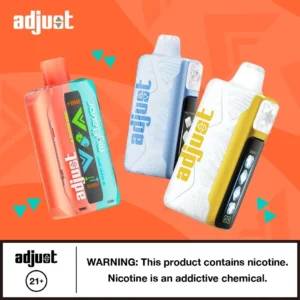
| Buttons & Display | Side “sugar cube” button to adjust sweetness; slider or toggle for power. The LED screen displays battery, e-liquid, and sweetness indicators. |
Getting started
- Unbox & Remove Sticker: Peel off the sticker so that you can start using the device.
- Draw to activate: MySweet is draw-activated; draw in and vape.
- Adjust Sweetness: When you press the side “sweetness” button, sugar cube symbols will let you know the sweetness level (labeled 0 to 4).
- Power / Mode Toggle: Power button is used to cycle through 3 power modes (low to high).
- Status Check: The screen shows battery life, e-liquid level, and current sweetness / mode setting.
For more details, see adjust vape instructions>>
Adjust MySweet 40,000 Flavors | Delicious Candy-fruit Blends
Each MySweet 40K flavor is crafted to be at its best under various levels of sweetness. All six sweet flavor options, if you want to explore more, see Adjust Vape Flavors.
| Flavor Name | Flavor Profile / Tasting Notes |
| Blue Razz B Pop | Tangy blue raspberry with a soda-like candy kick. |
| Lemon Heads | Zesty citrus with a strong sweet aftertaste. |
| Raspberry Orange | Tangy raspberry combines with vibrant orange. |
| Triple Berry | Blended berries in a juicy, sweet mix. |
| Watermelon Roll Ups | Sweet, retro watermelon candy flavor. |
| Wintergreen Savers | Refreshing mint with a sweet candy sting. |
Adjust MySweet 40,000 Vape | Specs
This is the important specs that power MySweet’s performance, and also what you can anticipate in practice, across modes and sweetness settings.
| Specification | Detail |
| E-Liquid Capacity | 20 mL prefilled |
| Battery | 850 mAh rechargeable, USB-C |
| Puff Count | Up to 40,000 puffs (Normal mode) |
| Nicotine Strength | 5% / 50 mg salt nicotine |
| Coil Type | Triple mesh coil for consistent vapor |
| Modes & Control | 3 power modes + 4 sweetness levels |
| Airflow | Adjustable or controlled via slider (depending on variant) |
FAQs
Q1: How do I adjust sweetness on MySweet 40K?
You can increase or decrease sweetness level by repeatedly pressing the sweetness button (shaped like an ice-cube). Sweetness level will be indicated by sugar cube icons that shows level from 0 (none) to 3 (sweet overload).
Q2: What is the difference between power modes?
Power I (Low): Max puff count, cooler vapor
Power II: Balanced output
Power III (High): Hottest vapor and flavour but reduced life of device
Q3: Is MySweet 40K a rechargeable device?
Yes, it uses an 850 mAh rechargeable battery, and you’ll recharge it with USB-C.
Q4: What if one flavor runs out before others?
The mixing system will continue to work as designed, but there will be a flavor differential. Many users report this flavor differntial as flavors are lost.
Q5: Does a higher sweetness mean I use more battery or juice?
Yes – using higher sweetness generally means higher output, and may use slightly more battery or e-liquid.
Q6: Where can I buy the Adjust MySweet 40K Disposable Vape?
You can buy it directly from our official Adjust Vape online store, offering authentic products, fast shipping, and responsive customer support.


3 reviews for Adjust MySweet 40K Disposable Vape
There are no reviews yet.