
A dead battery at 18,000 puffs when you paid for 40,000? That's not a defect — it's a care problem. Here's how to fix it before it starts.
Every Adjust Vape 40K device ships with a 900 mAh rechargeable lithium-ion battery and enough e-liquid for roughly 40,000 puffs. In practice, though, the number you actually get depends on three things: how you charge, how you store, and how you draw. Get all three right, and you'll ride that puff counter well past the finish line. Get them wrong, and you'll be tossing the device halfway through its lifespan.
This guide covers everything from cable selection to long-term storage. No filler. Just the stuff that keeps your MyCool 40K, MyRusher 40K, or any other Adjust 40K device running at peak performance until the last drop of juice is gone.
How the Adjust 40K Battery System Works
All five Adjust 40K product lines — MyCool, MyRusher, MySour, MyFlavor, and MySweet — share a similar internal architecture: a single lithium-ion cell paired with a smart chipset that manages output wattage, draw activation, and overcharge protection. The USB-C port at the base handles charging at a standard 5V/1A input.
The chipset does a lot of the heavy lifting. It cuts power when the battery hits full, throttles output when voltage dips below a threshold, and blinks the LED in patterns that tell you what's going on. But the chipset can't compensate for heat damage, port corrosion, or chain-vaping that never lets the coil cool down. Those variables are on you.
| Spec | Adjust 40K Series (All Models) |
|---|---|
| Battery Type | Rechargeable Lithium-Ion |
| Capacity | ~900 mAh |
| Charging Port | USB Type-C |
| Full Charge Time | 45–60 minutes |
| Max Puff Count | 40,000 |
| Overcharge Protection | Yes (auto-cutoff) |
Charging: The 5 Rules That Actually Matter
Not all charging habits are equal. A quick top-up at lunch hits different from leaving a device plugged into a laptop overnight with a gas-station cable. Here are the five practices that protect your battery across hundreds of charge cycles.
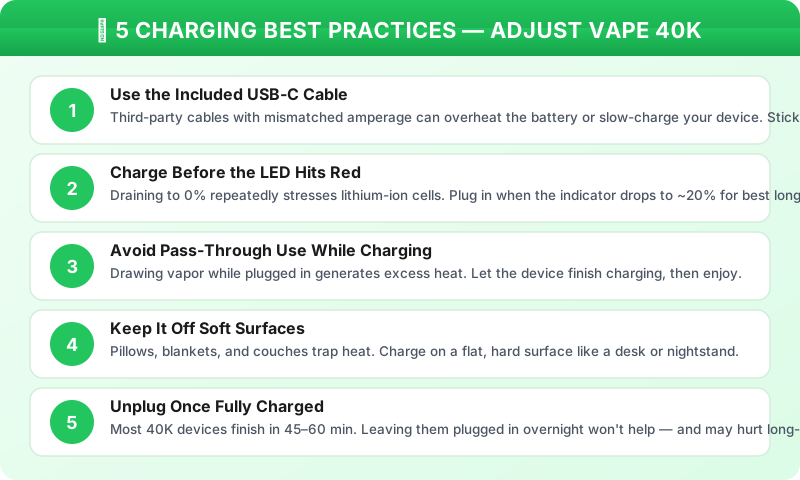
If you take away one thing from that graphic, make it this: don't wait until the device is fully dead to charge. Lithium-ion cells age faster when you repeatedly cycle them from 0% to 100%. Topping off at the 20–30% mark — when the LED shifts color — keeps the battery chemistry in its comfort zone. The U.S. Consumer Product Safety Commission (CPSC) has published detailed guidance on lithium-ion battery handling, and the principle is universal across devices: partial charges beat deep discharges every time.
Storage & Environment: Where You Keep It Matters
Heat is the silent killer of disposable vape batteries. A device sitting on a car dashboard in July can reach internal temperatures north of 140°F — well past the point where lithium-ion cells start degrading permanently. Cold isn't great either; below freezing, the e-liquid thickens and the battery delivers noticeably less power per draw.
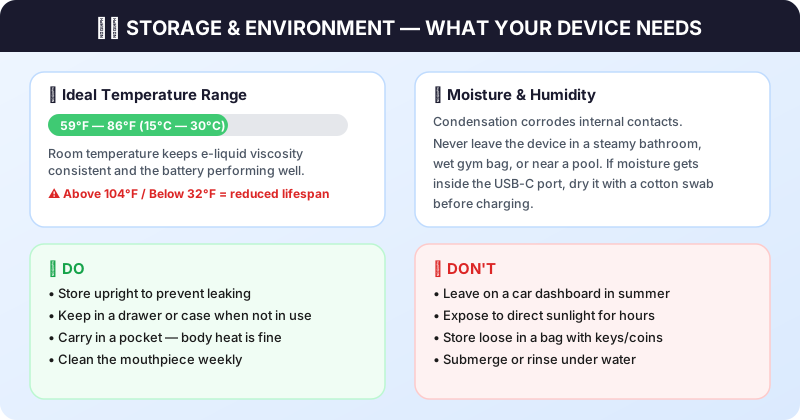
The ideal range sits between 59°F and 86°F — basically, normal room temperature. If you're comfortable, so is your vape. Outside of that window, expect shorter battery life and inconsistent flavor delivery. The U.S. Environmental Protection Agency (EPA) recommends that lithium-ion devices be stored away from heat sources and protected from physical damage, and those guidelines map directly onto disposable vapes.
Quick Cleaning Routine (Once a Week)
It takes about 90 seconds and prevents most airflow-related issues:
Step 1 — Wipe the mouthpiece with a dry cloth or alcohol swab. Pocket lint and lip residue accumulate fast. Step 2 — Use a dry toothpick or compressed air to clear the USB-C port. Debris in the port is the number-one reason devices stop charging. Step 3 — Check the airflow dial and make sure it rotates freely. On the MyCool 40K, a stuck dial defaults to minimum airflow, which overheats the coil and mutes flavor. Step 4 — If you see liquid around the base, blot it with a tissue and store the device upright for a few hours.
Troubleshooting the Most Common Issues
Before you assume a device is defective, run through this chart. Nine times out of ten, the fix is simple and takes under a minute.
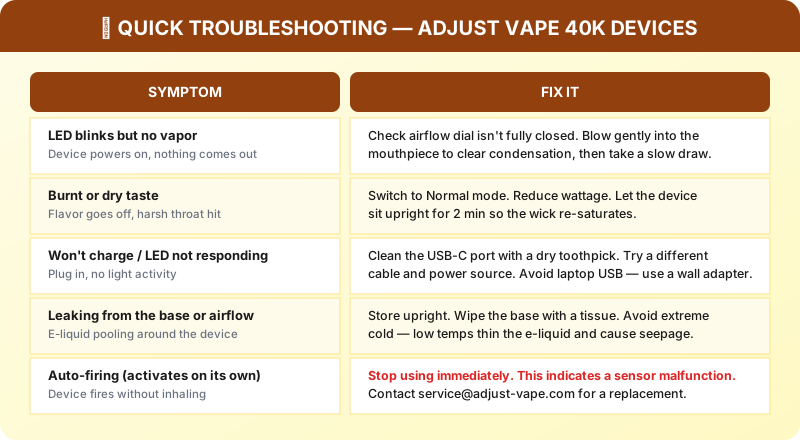
For the "burnt taste" symptom specifically, here's what most people miss: it's not always the coil. High-wattage modes like Rush Mode on the MyRusher 40K vaporize liquid faster than the cotton wick can absorb it. If you chain-vape in Rush Mode, the wick dries out mid-draw and you get that harsh, charred hit. The fix? Drop to Normal mode, take a few shorter puffs, and wait 10–15 seconds between draws to let the wick catch up. Our User Guide covers each wattage mode in detail.
Getting the Most Puffs: Practical Habits
Maximizing your puff count isn't about babying the device — it's about matching your draw style to the hardware. Adjust 40K devices are built for 40,000 puffs at a moderate, 2-second draw length. If you're pulling long 4–5 second draws in Turbo mode, you'll burn through both battery and e-liquid roughly twice as fast, which means you're effectively getting a 20K device.
A few concrete adjustments that extend device life without sacrificing the experience:
Match mode to moment. Use Normal mode for casual, all-day sessions. Save Rush or Turbo for when you actually want that dense, high-impact hit — not as a default. The MyCool's 4-level coolness control and the MySour's 4-level sourness dial both work independently of wattage, so you can dial in flavor intensity without cranking power. Shorten your draws. Two seconds is the sweet spot for flavor. Longer draws generate more heat, more vapor, and more e-liquid consumption — but not proportionally more nicotine or taste. Rotate devices if you own multiples. Giving a device a rest between sessions lets the coil cool and the wick resaturate fully. If you picked up a few flavors from the flavor collection, cycle through them instead of hammering one device all day.
When to Retire the Device & Disposal
All disposables have a finite life. When the LED blinks rapidly on every draw, vapor output drops to almost nothing, or you notice a persistent burnt taste that doesn't improve after resting, the e-liquid is likely depleted. At that point, it's time to dispose of the device responsibly.
Because Adjust 40K devices contain lithium-ion batteries, they should not go in your regular household trash or recycling bin. Lithium cells that get punctured or crushed in a garbage truck can overheat and start fires — this is a real and documented problem. The EPA recommends taking lithium-ion battery products to a certified electronics recycler or a household hazardous waste collection point. Most big-box retailers like Best Buy and Home Depot offer free battery drop-off bins near the entrance. Use them.
FAQ
How long does it take to fully charge an Adjust Vape 40K?
Can I use my phone charger cable for the Adjust Vape?
Why does my device taste burnt after charging?
Is it okay to charge my Adjust Vape overnight?
How do I dispose of my used Adjust Vape device?
See also: Adjust Vape not working troubleshooting guide